Client Alert - Microsoft Office update affecting Dynamics GP and Word Templates + Integration Manager & SmartConnect

Microsoft Office Update causing issues with Dynamics GP Word Templates, Integration Manager and eOne SmartConnect functionality
Microsoft Dynamics Canadian Payroll 2020 calendar(opens in a new tab)
Image

September 18, 2020 - Microsoft released an update to Microsoft Office products last week. Your organization may have installed this update on PCs and servers running Office 365 and standalone Office software. The update has been identified to cause issues that prevent GP Word Templates from functioning. This same update has also caused issues that impact GP Integration Manager and eOne SmartConnect.

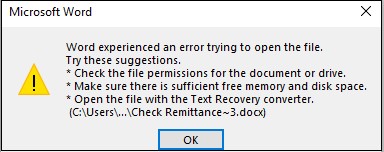
The Word Template issue causes a message like the above to be displayed when a Template report is generated by GP.

Microsoft is aware of the issue and is working on a Hotfix. For the time being, the only way to resolve the issue is to roll back the Office update.
Please follow the steps in this article to roll back the Office update. https://support.microsoft.com/en-ca/help/2770432/how-to-revert-to-an-earlier-version-of-office-2013-or-office-2016-clic

If you have any questions or require assistance to resolve these issues please contact the Endeavor4 Solutions Support team by emailing support@endeavoursolutions.ca

Microsoft Dynamics Canadian Payroll 2020 calendar(opens in a new tab)

Microsoft Office Update causing issues with Dynamics GP Integration Manager and eOne SmartConnect
Image

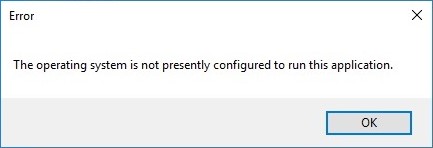
The issues with GP Integration Manager and eOne SmartConnect are also caused by the Office update. When attempting to run an Integration or a SmartConnect map you will receive the above error.

To resolve these issues, you need to download and install the Microsoft Access Database Engine 2010 Redistributable from this link.

https://www.microsoft.com/en-us/download/details.aspx?id=13255

Select the 32-bit version, not the 64-bit version when downloading. If you receive an error stating that you have 64-bit Office products installed, follow the steps in this article from eOne.

https://www.eonesolutions.com/help-article/the-operating-system-is-not-presently-configured-to-run-this-application/

If you have any questions or require assistance to resolve these issues please contact the Endeavor4 Solutions Support team by emailing support@endeavoursolutions.ca

Image
Testimonials

91% of Endeavor4 clients said that they would recommend our services and support

  • We had an excellent experience working with Endeavor4 and their team on the implementation of Business Central and the integration with our CRM system. Thanks to Shannon’s leadership on the project and her outstanding training, guidance, and hands-on support, her clear explanations, patience, and commitment made a significant difference in helping us understand and use the system effectively. She is truly an exceptional instructor and professional. Bharat did a wonderful job handling the complex CRM synchronization with Business Central. His technical expertise, dedication, and outstanding support gave us confidence in the system and allowed us to fully trust the integration.
    Mr Chawla, Endeavor4 ERP, CRM, & Cloud client
  • Brittni was our technical support for an A/P integration project. Her exceptional service and extensive knowledge made this implementation such a fantastic experience. Throughout the project she responded quickly, communicated clearly, and was able to easily troubleshoot any challenges the implementation posed. We are extremely grateful for her guidance and positive attitude throughout the project and for the successful completion of this initiative in a timely manner.
    Ms. Pick, Endeavor4 ERP client
  • Endeavour worked with our company to provide a custom database and CRM function within our Microsoft Dynamics platform. The support team of Roy, Mark and Natalie were very responsive to our needs and strove to deliver a solution that fit our objectives.
    Mr. Sutter, Endeavor4 ERP and CRM client
  • Endeavour Solutions (Nicholas, Mark, Natalie and Daniel) have been exceptional in launching and running our project. They were super quick to get started and demonstrated a deep understanding of our requests. Their team worked diligently to accommodate all our needs. Although this is just phase 1 of the project, we are eagerly looking forward to the next phases to polish and integrate with our new ERP solution.
    Mr. Duzenburry, Endeavor4 ERP client
  • We had the privilege of collaborating closely with Bharat to develop excellent custom reporting and integration solutions. He demonstrated exceptional dedication, particularly in grasping the complexities of our external system (which is notoriously challenging for generating reports) and seamlessly integrating it with our Microsoft ERP. Resolving this significant challenge was made effortless by Bharat's expertise and commitment.
    Mr. Plouff, Endeavor4 ERP client
  • A great job and great impression about the Endeavour team. We have finished the phase one of the project, we are now live with our new Microsoft ERP. Transitioning from our previous ERP to Business Central 365 went smooth and well-managed, thanks to Endeavor4 team. Special thanks to Vish from Endeavour since he has shown the knowledge and needed expertise as expected, a big thanks for Ankur too. Looking forward to implement phase two of the project where we are planning to explore more modules.
    Mr. Koni, Endeavor4 ERP client
  • I can't say enough good things about the Microsoft Dynamics support I receive from Endeavor4. As the world gets more complicated, I know I have a trusted business partner in Endeavor4 working hard beside me. And a special 5-Star review to Senior Consultant Brittni, who at the end of a long day is still smiling and laughing helping me untangle Mekorma and Multi-Entity.
    Mr. Ethington, Endeavor4 ERP client